Failure analysis · Root cause · Flaky tests

Find out why your build failed

TestLookup groups your failed software tests by cause and labels each one with a kind and its evidence. It tells flaky tests, which pass and fail at random, from real bugs. Built-in rules check every failure without an AI model, and your team can confirm or correct any answer.

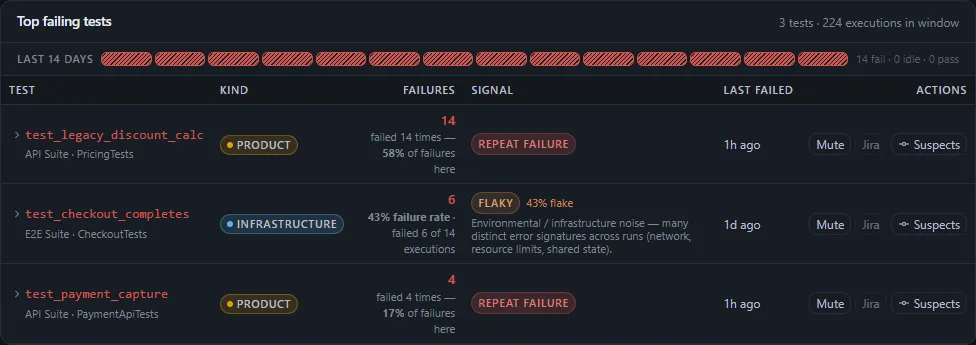
Top failing tests for an e-commerce project, with a 14-day strip that has a failing run every day and three tests: test_legacy_discount_calc and test_payment_capture marked Product with a repeat-failure signal, and test_checkout_completes marked Infrastructure and flaky at a 43% flake rate, each with its failure count, when it last failed, and Mute, Jira and Suspects actions.
Sample data Top failing tests, each with its kind and signal
  • Works without an AI modelRules check every failure. A local AI model through Ollama is optional.
  • Corrections that stickYour correction beats rules and AI models the next time that test is analyzed.
  • Flaky tests, scoredFour signals and a measure of how sure the score is. A test needs 5 results before it gets a score.

Every failure grouped, classified and owned

Work from what's failing across the whole project, instead of one failed build at a time.

Failures

Grouped by cause, labelled by kind

Failures with the same error pattern form one group. Flaky failures that share a cause across runs form a larger group, called a systemic cluster. Each failure gets a kind, with its evidence and history: product bug, infrastructure, test data, flaky, or automation defect, which is a bug in the test itself.

  • Top failing tests shows each test's kind, failure count and pattern, such as repeat failures or flakiness
  • Suspects lists the code changes since the last passing run, ranked by how many of the same files they touch
  • With classification hints, a QA lead can send matching failures straight to a kind
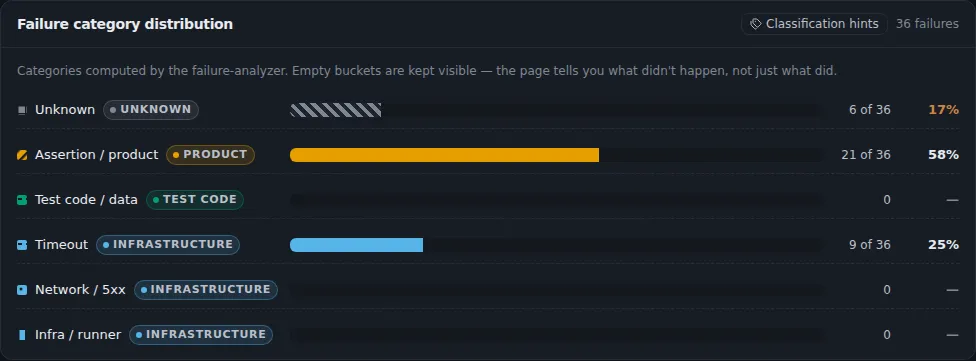
Failure categories for 36 failures: assertion or product 21, timeout 9 and unknown 6, with test code or data, network and infrastructure runner still shown at zero, each tagged Product, Test code, Infrastructure or Unknown.
Sample data Failures by error type, each mapped to a kind: product, test code or infrastructure

Inbox

Each failure goes to an owner

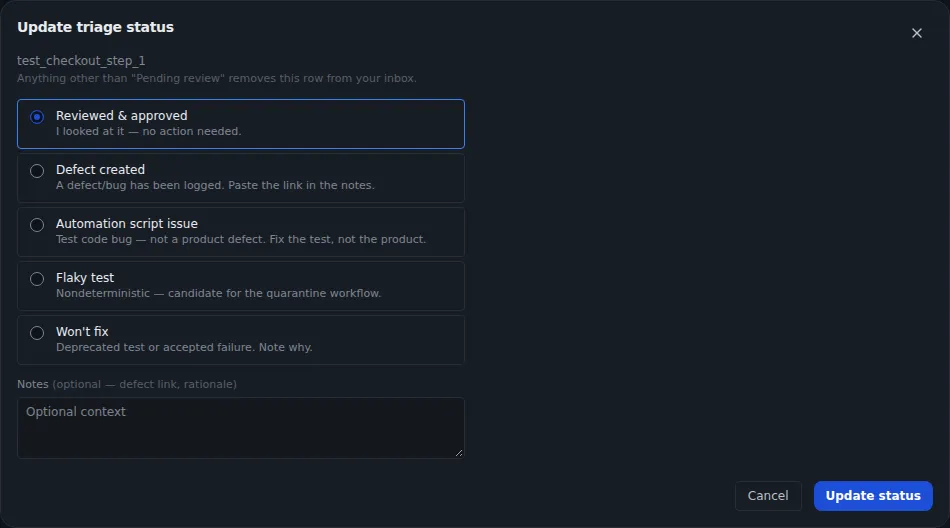
When a run finishes, TestLookup assigns each failed or broken test that nobody owns yet. It works through a list that starts with the suite owner and your ownership rules, including your CODEOWNERS file. The owner records what they found from the Inbox in one step, and QA leads can reassign it.

  • Outcomes include defect created, automation script issue, flaky test and won't fix
  • A later run keeps any reassignment made by hand
  • Approvals collects AI reports, requests to set flaky tests aside (quarantine) and defects waiting for a decision
Update triage status dialog for a failing test with options: reviewed and approved, defect created, automation script issue, flaky test, and won't fix.
Sample data Triage a failure in one step

Analysis that works without a model

Every analysis records which engine produced it and why, so you can check any answer.

Engines

Rules, your own trained model, a local AI model

Rules check every failure and need no AI model. An administrator picks one of four modes in Settings › AI: Rules, ML, LLM or Auto, which is the default. An optional local AI language model runs through Ollama, using qwen2.5:7b-instruct by default.

  • ML mode uses machine learning: a model trained on your team's labelled failures
  • That model starts work once it has 200 labelled examples and scores 80% on examples kept back for testing. Auto mode then prefers it.
  • Offline mode is on by default and blocks cloud AI providers
  • If an AI model call times out, TestLookup falls back to a faster classifier model, then to rules
  • Automatic actions happen only when an answer's confidence reaches the threshold: 80 out of 100 by default, set in Settings › AI
  • Ask AI chat needs LLM or Auto mode and stays within one project
Start with a local AI modelbash · Makefile
make dev-llm

Run it from the top folder of your copy of the TestLookup code. It starts everything with Docker Compose, including Ollama, and downloads the local AI models TestLookup uses.

History

Every analysis kept as a version

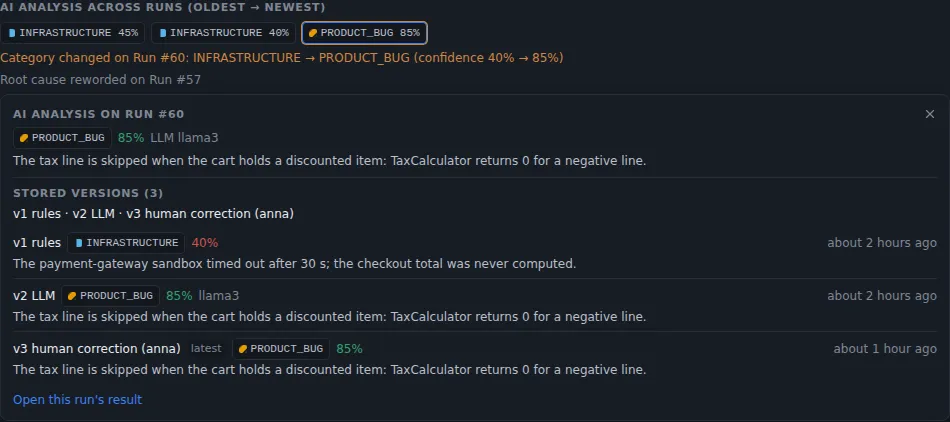
TestLookup saves each analysis of a run or test result as a version, with its engine and model. Running it again adds a new version and keeps the old answer. A QA engineer's correction is saved next to the original, comes first the next time that test is analyzed, and teaches the trained model.

  • Compare any two versions, or compare a run with the one before
  • A comparison warns you first when two analyses came from different engines
  • Each run-to-run summary says whether an AI model wrote it or TestLookup built it from the differences
AI analysis across runs: stored versions from the rules engine, a language model and a human correction, with the category changing from infrastructure to product bug.
Sample data Each analysis is kept as a version, including human corrections

Deeper answers, approved by people

AI work makes proposals, and a person decides what is accepted, filed or merged.

Root cause (AI)

Deep investigation for one run

Root cause (AI) groups a run's failures, checks each group against the evidence available, and records a finding for each group. Before it starts, a quick scan groups the failures by error without calling an AI model. The cost and time estimate comes from the project's last 20 finished investigations.

  • Administrators can set a monthly AI spending limit for each project. Local models count as zero.
  • Needs an analysis mode that can use an AI model, and only a local one in offline mode. If it can't run, the page says why.
  • Settings lists every AI analysis run with its steps and report
  • File defect turns a group into a defect, with its evidence attached
  • Defects after approval

    You can create a tracked defect from a group, from a failing test or by hand, and nothing is filed until you confirm. A QA lead must approve defects that go to Jira, are critical or high, or come with low AI confidence. In offline mode, defects, approvals and status changes still work inside TestLookup.

  • Reports start as drafts

    Every AI report waits for a QA lead to accept it, or reject it with a reason such as an unsupported claim or missing evidence. Until a date an administrator sets, TestLookup only records which reports it would have held back. After that date, unreviewed reports stop going out in exports, share links, notifications, webhooks or pull request comments.

  • Fixes arrive as draft pull requests

    The Fixer suggests changes to the test code only, for flaky tests that are set aside. It opens a draft pull request, a proposed change for your team to review, only after every rerun in an isolated test area passes. It starts turned off, can't merge anything, and stays idle while offline mode is on.

Flaky tests, separated from real failures

TestLookup scores flakiness from each test's history. A test that fails the same way every time counts as a regression: something that worked before and is now broken.

Flaky tests

A score you can check

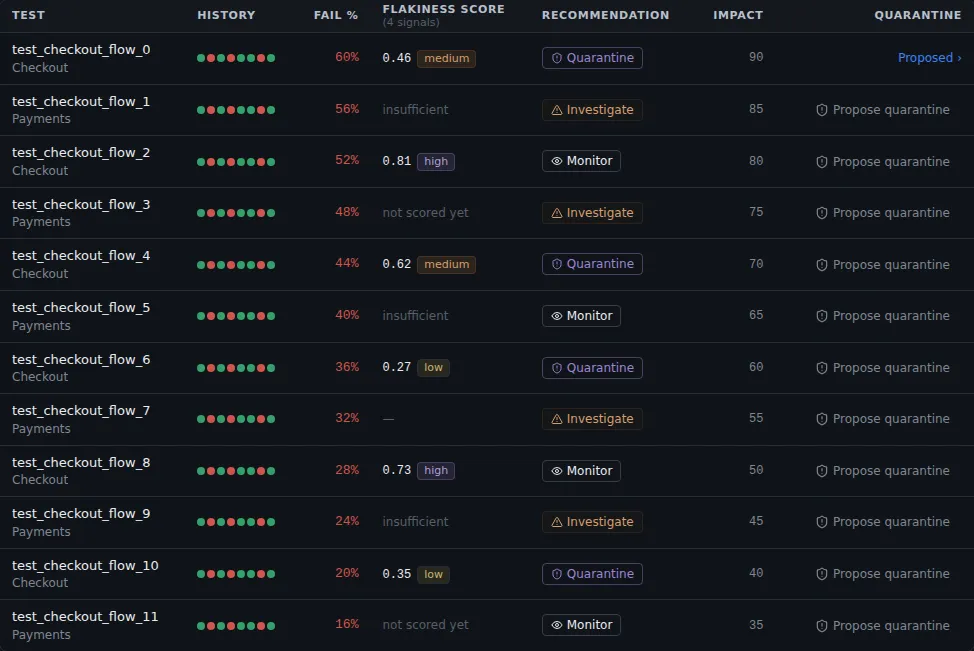
The flakiness score is a weighted average of four signals: result flips, retries, environment instability and changes in duration. A separate confidence level comes from how many results the test has. Below 5 results, the test gets no score at all, rather than a score of zero.

  • Each test shows its four signals with their values and weights
  • Each test gets a recommendation: quarantine, investigate, monitor or healthy, sorted by impact
  • Step flakiness across runs shows which step inside a test flips between pass and fail
Flaky tests table with a dot for each pass and fail, failure rate, flakiness score with confidence, a recommendation to quarantine, investigate or monitor, impact, and a Propose quarantine button.
Sample data Flaky tests ranked by score and impact

Quarantine

Set tests aside openly, with approval

A QA lead proposes setting a test aside, called quarantine, with a reason. They start from the Mute action on the Failures page or from the Flaky tests page, and a QA lead approves or rejects it. A quarantined test still runs and records results, but the release check leaves out its failures.

  • TestLookup never skips or changes a test in your code
  • Requests nobody decides on expire after 7 days
  • An approved quarantine lasts as long as your policy says: 14 days by default
  • The list marks quarantines that have run past their time limit, and tests ready to come back
Fail CI only on real failuresbash · TestLookup CLI
testlookup ci-verdict --run "$RUN_ID" --project "$PROJECT_ID"

It ends with 0 when there are no failures or every failure is quarantined. It ends with 1 when any failure isn't quarantined, and 2 when TestLookup can't answer. Details: point the command-line tool at your server first, with testlookup auth login or the TESTLOOKUP_URL and TESTLOOKUP_API_KEY settings. RUN_ID is the run you uploaded.

Follow one failure from start to finish

Run TestLookup on your computer with sample results, or try the failure walkthrough in your browser first. The walkthrough uses made-up data.