AI agents · Human approval · AI assistants

Agents propose, people approve

After every automated test run, TestLookup's AI agents look at the failed tests for your team. The Investigator finds why a run failed and suggests actions, such as setting aside a flaky test that passes and fails at random. Those actions run only after a QA lead approves them.

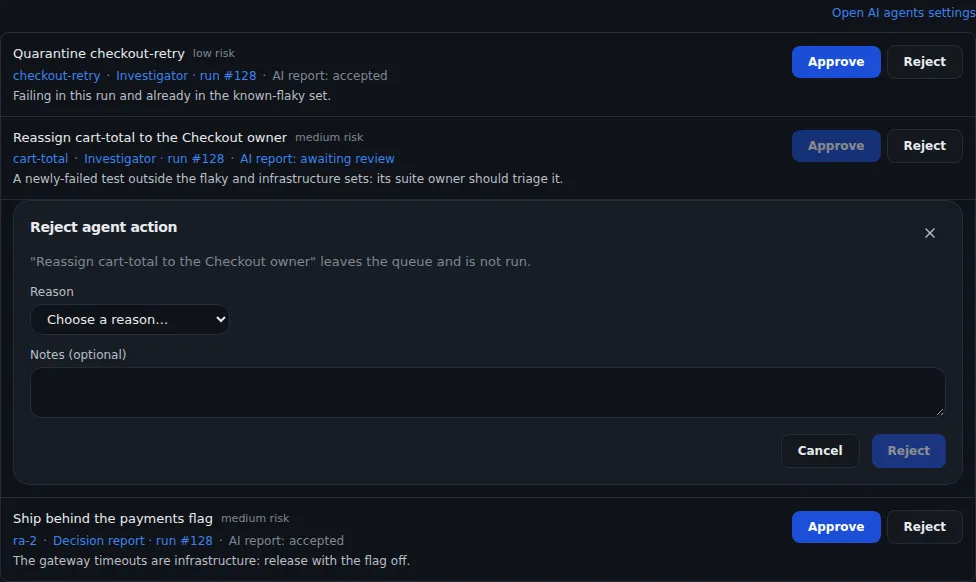
Inbox agent actions: proposals to quarantine a flaky test, reassign a failure and ship behind a flag, each with Approve and Reject, and a reject dialog asking for a reason.
Sample data Agent proposals waiting for a person
  • Shadow by defaultThe Investigator starts in Shadow mode. It records what it would do and changes nothing.
  • No automatic approvalA QA lead signed in to TestLookup approves each agent action, and any action can be undone.
  • Reports checked before publishingIn a deep analysis, a final checking step reviews the decision report and holds back any report it can't verify.

Every test run gets analyzed

A pipeline is a series of analysis steps that run in order. The standard pipeline starts on its own when a test run finishes. Start the deep pipeline when you need a decision report that has been checked.

Standard pipeline

Five stages after every finished run

When a test run finishes, TestLookup queues the standard pipeline. Its stages import the results, look for anything unusual, find the likely cause and write a summary. When the analysis is confident enough, a fifth stage triages the failures, which means deciding what to do with each one.

  • Results appear on Pipeline runs and on the run's Evidence tab, with each stage's timing and status
  • Each stage records its result, its evidence and how it reached its decision
  • A stage that fails switches to its backup plan and is marked as failed, so you can see it
  • A retry picks up after the stages that already finished, for up to 5 attempts in total
  • Starting, retrying and stopping a pipeline need the QA engineer role or above
  • In the app, this pipeline is listed as offline

Deep pipeline

Up to 20 stages, checked before publishing

Start a deep investigation yourself: for one run from Failures › Root cause (AI) or a run's Analyze failures, or for many runs from Runs. It plans up to 20 stages, including grouping similar failures, specialist checks, a risk score and a decision report. A final checking step, the critic, then reviews the report and holds it back if it can't verify it.

  • Up to 5 specialists run side by side, and 4 of them are on by default
  • The risk score comes with a GO, Conditional GO or NO-GO recommendation for the run
  • A stage whose feature is turned off is skipped, and the skip is recorded
  • TestLookup checks the pipeline against its plan before the report is published
  • Each pipeline has limits on AI model calls, tokens (the pieces of text a model reads and writes), cost and running time
  • It won't start while the analysis mode is Rules, and the Root cause (AI) page says why

Specialists

Specialists add evidence to deep runs

In a deep pipeline, four specialists run side by side, and they only read data. Contract validation checks the run's API calls against what each API promises, and log intelligence gathers logs and traces for each group of failures. The regression check tells new breakages apart from known flaky tests and environment problems, and change ownership links each group of failures to its owners.

  • They're on for new installations. If you upgraded, turn them on in Settings › Feature flags
  • Log intelligence reads logs from Splunk, a log search tool. Offline mode keeps Splunk switched off
  • A check with too little evidence says so and reports "not enough evidence"
  • The fifth specialist, defect promotion, changes data, so it ships turned off
Evidence from specialist agents on a test run: an API contract check finding a missing required field, and log analysis reporting error spans and slower response times (p95 latency) during the failures.
Sample data Evidence from specialist agents

Find out why a run failed

The Investigator tests five possible explanations at once. It names the most likely cause, how sure it is, and what to do next.

Investigator

Five possible causes, checked at once

First, a planning step gathers the evidence. Then five agents check five possible causes at the same time: infrastructure, a code change (commit), the environment, a known flaky test, or a real regression. A final step names the main cause, how sure it is and what to do, or answers "unknown" when no cause fits or the top two disagree.

  • Starts when you ask, when tests newly fail, or after a NO-GO recommendation
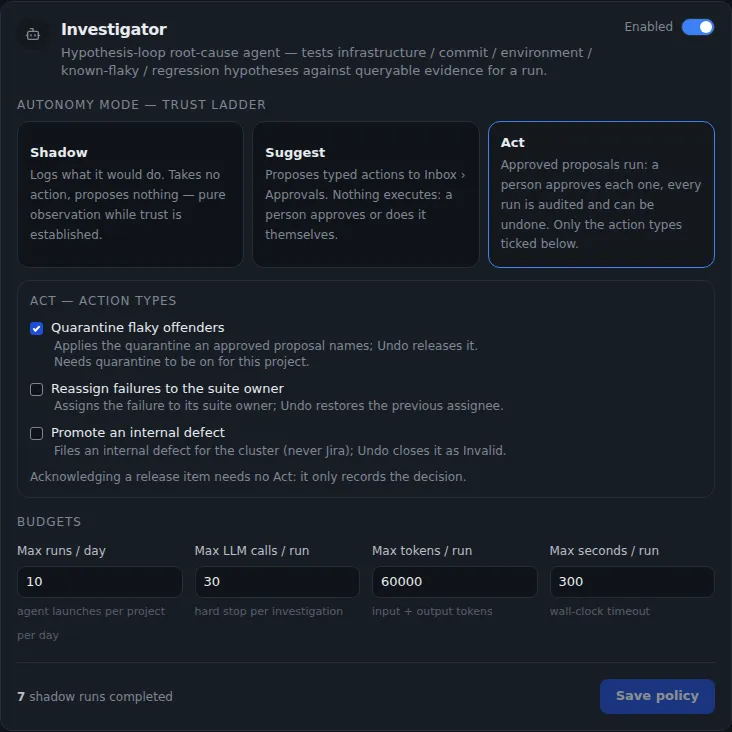
  • By default, it runs up to 10 times a day, each time within 30 model calls, 60,000 tokens and 300 seconds
  • Rules score each possible cause first, and an AI model may then refine the result once
  • With no AI model, it still finishes and gives a rules-only answer
  • One investigation per run at a time
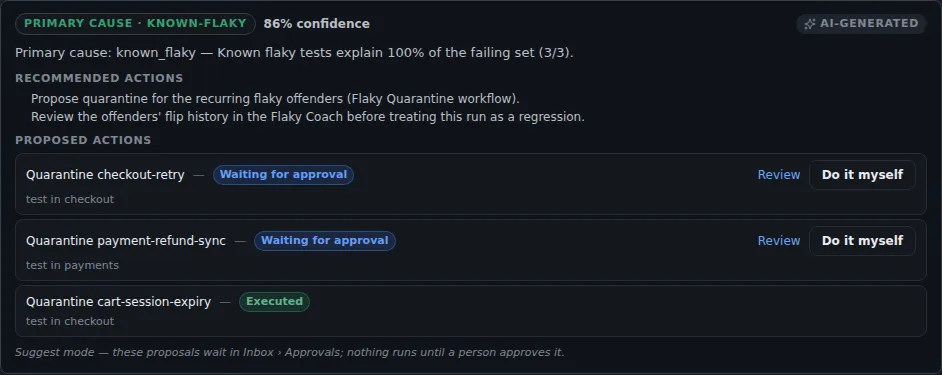
Investigator result: primary cause known flaky at 86% confidence, recommended actions, and three proposed quarantines, two waiting for approval and one marked executed, with a note that in Suggest mode nothing runs until a person approves it.
Sample data An investigation with its proposed actions

You decide how far agents go

Agents move up from Shadow to Suggest, and the Investigator can go on to Act. Only a QA lead moves them, and every proposal waits for a person.

Trust ladder

Shadow, Suggest, Act

Opt-inShadow is the default. A QA lead turns on Suggest or Act for each project.

In Shadow, the Investigator records the actions it would take and changes nothing. In Suggest, it sends three kinds of proposal to Inbox › Approvals › Agent actions: set aside a flaky test, reassign a failure to its suite owner, or promote an internal defect. In Act, an approved proposal runs within a minute, but only for the kinds of action a QA lead has ticked.

  • Shadow runs list the actions the agent would have taken. A QA lead reads them before moving the agent up to Suggest
  • Rejecting a proposal needs a reason. A newer investigation replaces older proposals that are still waiting
  • Setting aside (quarantining) flaky tests needs quarantine turned on for the project
Investigator agent settings: the Shadow, Suggest and Act trust ladder with Act selected, three action types (quarantine, reassign, internal defect) and budgets for runs per day, LLM calls, tokens and seconds per run.
Sample data Agent trust ladder and budgets

Approvals

A person approves every action

Nothing is approved automatically. A QA lead approves each action while signed in, and API keys can't approve anything. Someone must accept the AI report first, and the person who asked for the investigation can't approve its actions.

  • Every action is logged, shows in the activity feed and can be undone
  • All three kinds of action stay inside TestLookup, and a promoted defect isn't sent to Jira
  • If an action's result is unknown, TestLookup leaves it for you to check instead of retrying it
  • Recommendations from a deep run's decision report wait here too, such as shipping behind an on/off switch. Approving one records it and changes nothing

Workflows you can copy, change and check

Each pipeline follows a workflow: a set of steps with a version number. Copy (fork) a built-in workflow, change it, and replay real runs through it before your project uses it. Every pipeline leaves a record you can replay.

Workflow editor

Versioned workflows you can copy

The built-in standard, deep and live workflows are read-only templates. Fork one to edit its steps, the links between them, conditions, loops with a set limit, and its retry and review rules. TestLookup replays 20 recent runs through your draft, then checks it again on 100 when you publish.

  • TestLookup checks each draft for mistakes before you test it
  • If the results get worse, publishing is blocked unless a QA lead accepts the drop with a reason
  • A published version never changes. Your next edit becomes a new draft
  • Make your published copy the default for your project's new runs
  • Advanced fields, such as conditions, are edited as JSON, a common data format, and checked
  • Forking, editing and publishing need the QA lead role

Audit and Compare

Check what each pipeline did

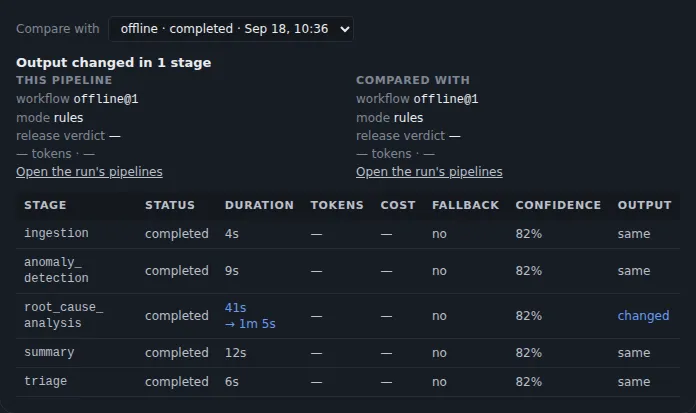
When a pipeline starts, TestLookup saves a fixed copy of its workflow, plus its plan with a fingerprint (hash). The Audit tab shows whether you can replay the pipeline, with fingerprints (checksums) of each stage's input and output. Compare shows two pipelines for the same run side by side, stage by stage, and marks what changed.

  • A value the pipeline didn't report shows as a dash instead of zero
  • Audit lists the saved memories each pipeline read
  • A stage the planner skipped is recorded with the reason
Comparing two analysis pipelines of one run: a table of the five stages (ingestion, anomaly detection, root cause analysis, summary, triage) with status, duration, fallback, confidence and whether each output changed.
Sample data Two pipeline runs compared stage by stage

Agent memory

Memory that records its source and expires

An agent looking at a failing test can recall what your team already knows: corrections people made, earlier analyses, similar past failures and past quarantines. Each memory records where it came from and how far to trust it. A newer entry replaces an old one without overwriting it, and entries expire after 365 days by default.

  • Expired entries stay as an audit record, and their search data is removed
  • Agents recall only active entries from your own project that haven't expired
  • TestLookup removes secrets and personal data from memory text before saving it

Use agents from your own tools

Start one agent through the API, or connect an AI assistant through MCP, a standard way for assistants such as Claude or Cursor to use other tools. Both get the same role and project checks.

Agent API

Start one agent on a saved run

The agent catalog lists every agent and the data each one accepts and returns. Start an agent on a saved test run, then check on it, follow its live updates, retry it or cancel it. Sending the same request twice is safe: with the same request key, the agent runs only once.

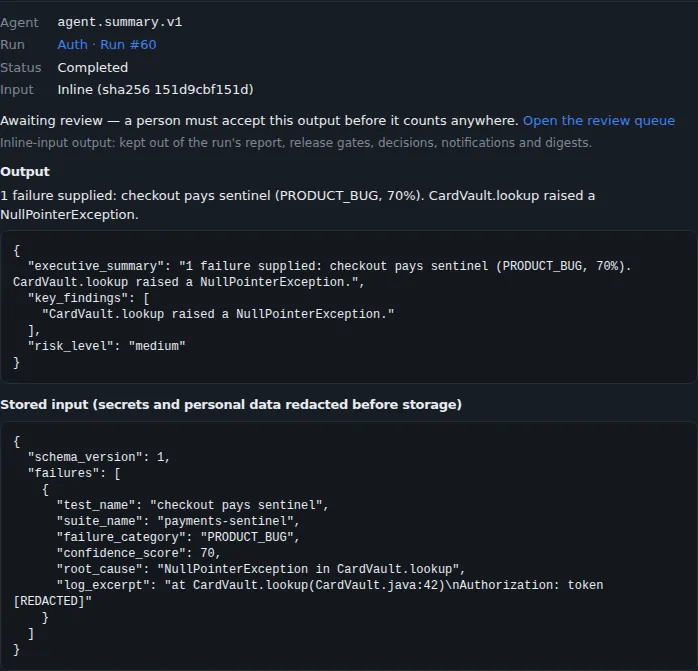
  • When an agent writes a report, the report waits for a person to review it
  • Starting an agent needs the QA engineer role or above, and it counts against the project's AI spending limit
  • Ready-made curl and Postman examples are generated for you, and TestLookup's own CI fails if they fall out of date
A single agent run waiting for review: the summary agent's output as JSON, and its saved input with the sign-in token hidden.
Sample data An agent result waiting for review

MCP server

Give your AI assistant TestLookup's tools

The MCP server gives AI assistants, code editors and CI agents 80 tools, 11 resources and 7 prompts. Each tool call becomes an API call made as a TestLookup user, so the usual role and project checks apply. Accepting reports and approving agent actions stay with people, because the server has no tool for either.

  • Connects on the same machine (stdio) or over the network (SSE)
  • Over the network, TestLookup checks each caller's own sign-in token on every request
  • The server signs in as a TestLookup user and doesn't accept API keys
  • Every change it makes is logged with the caller's identity
Connect an AI assistant on the same machine (stdio)json · MCP server README
{
  "mcpServers": {
    "testlookup": {
      "command": "python",
      "args": ["/absolute/path/to/testlookup/mcp/server.py"],
      "env": {
        "TESTLOOKUP_API_URL": "http://localhost:8000",
        "TESTLOOKUP_USERNAME": "agent-bot",
        "TESTLOOKUP_PASSWORD": "${TESTLOOKUP_PASSWORD}"
      }
    }
  }
}

Run the server from a clone of the repository, after you install its dependencies with pip install -r mcp/requirements.txt or make mcp-install. Point your client at that Python and the full path to server.py, and create a TestLookup user for each agent with only the role it needs. If your client doesn't fill in ${…} values in env, set TESTLOOKUP_PASSWORD where the client starts.

Fixer

Flaky-test fixes as draft pull requests

Off by defaultTurn it on per project, set up a sandbox runner and turn offline mode off.

The Fixer picks your flakiest quarantined tests and writes a fix that changes test files only. It reruns each test in a sandbox, a sealed-off space for running code. Only a fix that passes every rerun becomes a draft pull request, a proposed code change for review, and the Fixer never merges it.

  • It opens pull requests in Suggest mode only
  • Reruns use Docker with networking turned off, or GitHub Actions
  • Runs daily, weekly or when you ask, within limits for each run
  • When someone merges or closes a Fixer pull request, TestLookup records the outcome, just like a fix by a person

Follow one failure from start to finish

Try the failure walkthrough in your browser with made-up data, or read how to set up AI models, spending limits and offline mode.