Release management

Plan, track and ship every software release

Plan each software release in phases, from planning to production, and see every release on one calendar. TestLookup gives each release a GO or NO-GO verdict from its test results and open defects. Until enough tests have results, the release shows Not evaluated, and every override keeps a written reason.

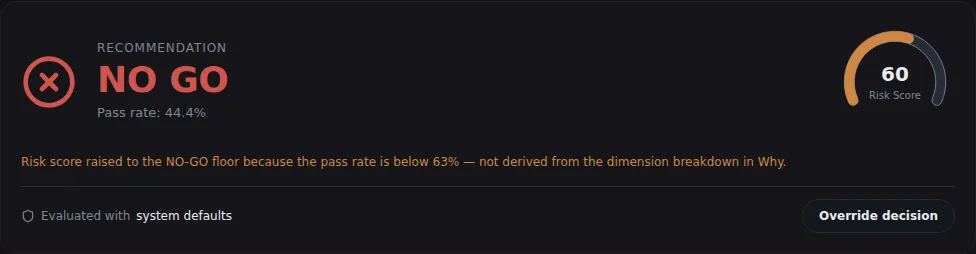
Release gate card for one test run: a NO GO recommendation at a 44.4 percent pass rate, a risk score of 60, and an Override decision button.
Sample data A test run's recommendation on the Release gate page, with its risk score
  • Phases and calendarPlan releases phase by phase and export the schedule to your calendar.
  • At least 5 testsA release gets no verdict until at least 5 different tests in it have results.
  • Codes your CI can readOne command ends with 0 for GO, 1 for NO-GO and 3 when there's no verdict yet, so your continuous integration (CI) system can act on it.

Plan releases phase by phase

A release is more than a verdict. It has an owner, a schedule and an outcome in production.

Phases

From planning to production

Give a release phases such as planning, QA testing, user acceptance testing, staging and production, and move each one on as work completes. Start the schedule by copying an earlier release's phases, or draft it from a product requirements document (PRD). TestLookup always drafts one from the document's headings, and an AI model drafts one too when your analysis mode allows it.

  • Each phase shows a live verdict from its linked runs
  • Record an incident, or a rollback to the previous version, after shipping
  • A release can have a named owner
  • A run that names a release TestLookup doesn't know yet creates it
  • Mark as Released works only once every phase is completed or skipped
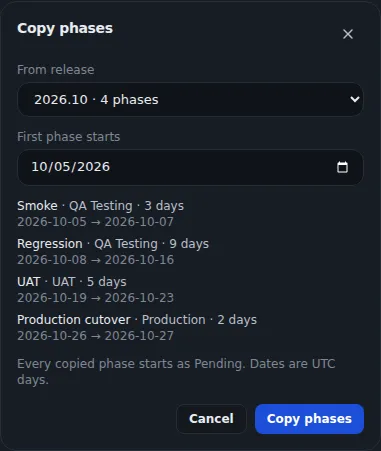
Copy phases dialog: choose a source release and a start date, then preview four phases (smoke, regression, UAT, production cutover) with their dates.
Sample data Copying phases from an earlier release

Calendar

Every release on one calendar

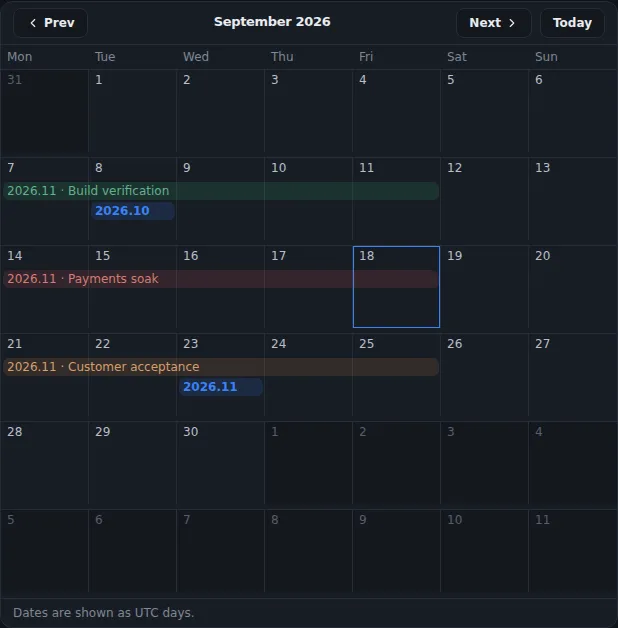
Switch the release list to a month calendar of release dates and phase dates, and share a link that opens the same month. Export the schedule as an iCalendar file for Outlook, Google Calendar or Apple Calendar, or as a CSV file for a spreadsheet. Release names and links can come from GitHub milestones or Jira fix versions.

  • Importing a newer calendar file updates the events instead of adding copies
  • Exports cover one project or all your projects
  • Syncing needs that integration set up and offline mode off. It brings in names and links only.
Release calendar for September 2026 showing release phases such as build verification, payments soak and customer acceptance as bars, and two release dates.
Sample data Release calendar

Release health

See which releases are blocked

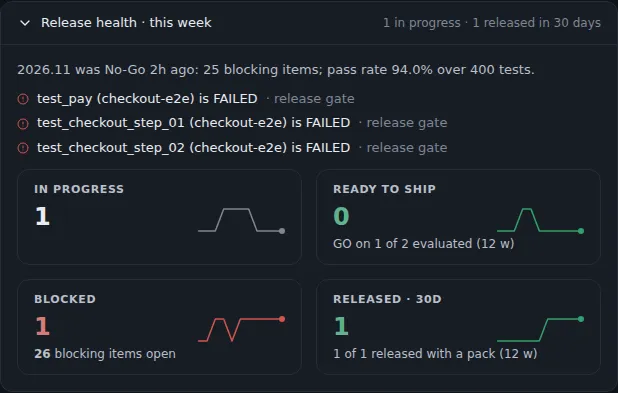
Release health counts releases in progress, ready to ship, blocked, and released in the last 30 days, each with a 12-week trend. It names the failing tests behind a NO-GO. Administrators, and anyone in 2 or more projects, can switch to All Projects for combined dashboards, trends and value metrics, meaning the estimated engineer-hours saved.

  • A member's All Projects view counts only their own projects
  • TestLookup works out the trend only when you open it
Release health this week: a release that went NO-GO with blocking failed tests listed, and tiles for in progress, ready to ship, blocked and released in 30 days with 12-week sparklines.
Sample data Release health across releases

A clear verdict for every release

Runs find their release on their own. The verdict waits until enough tests have results.

Release gate

GO, NO-GO or Not evaluated

The Evaluate gate action reads the latest result of each test linked to the release, and the open defects against it. It records GO, NO-GO or Not evaluated. With results from fewer than 5 different tests, the release stays Not evaluated, and no policy setting changes that minimum.

  • An open critical or high defect makes the release NO-GO
  • A test whose latest result failed blocks the release, unless it has been set aside (quarantined)
  • A verdict doesn't update itself, so evaluate again after new runs arrive
  • Each release phase gets its own verdict
  • Conditional GO is only for a single test run's recommendation, described below
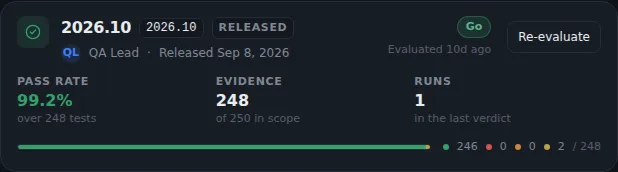
Released version card with a Go verdict, 99.2 percent pass rate over 248 tests and evidence for 248 of 250 tests in scope.
Sample data A released version with its verdict and evidence

Linking runs

Runs join the right release

A run joins the release it names. Otherwise, TestLookup tries its pull request's GitHub milestone, then your attribution rules, which link runs to releases, then a release whose cut-off window includes the run. As a last resort, the run joins the release that was active when it ran.

  • The GitHub milestone step needs that integration set up and offline mode off
  • Rules match branch, build number, tag or environment
  • Preview a rule against the last 200 runs before saving it
  • A rule leaves alone any run that named its own release
  • QA leads edit the rules, and every role can read them

Risk scores and policies you control

A test run's recommendation comes from rules you can read and change.

Run recommendation

A risk score behind every recommendation

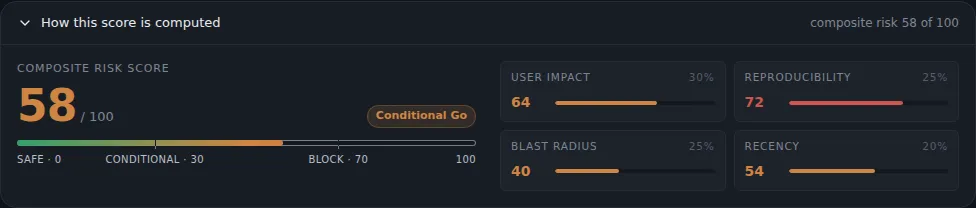
A deep investigation of a single test run adds a GO, Conditional GO or NO-GO recommendation, with a combined risk score. Seven weighted factors feed the score, including user impact, reproducibility and blast radius, and low confidence in the diagnosis raises the risk. The recommendation is plain arithmetic, with no AI model writing it.

  • A pass rate below the hard minimum in your policy means NO-GO, whatever the score
  • Blocking issues and conditions for GO come with every recommendation
  • Quarantined flaky tests don't count toward the failures
  • Deep investigation is not available in Rules mode
A test run's composite risk score of 58 out of 100, rated Conditional Go, broken down into user impact, reproducibility, blast radius and recency.
Sample data How a test run's risk score is worked out

Gate policies

One policy per project, with versions

A gate policy is the set of rules behind a verdict. Each project follows one: its own active policy, or the system default. Its thresholds, pass-rate bands and rules can only make a verdict stricter, and the simulator tests a draft on a real run before you publish it.

  • Rules that block or warn on repeat flaky failures, open defects and risk factors
  • Compare two versions, or start a new one from an older one
  • Your pass-rate bands draw the GO line on Trends and Live
  • Administrators write policies, and QA leads can read them
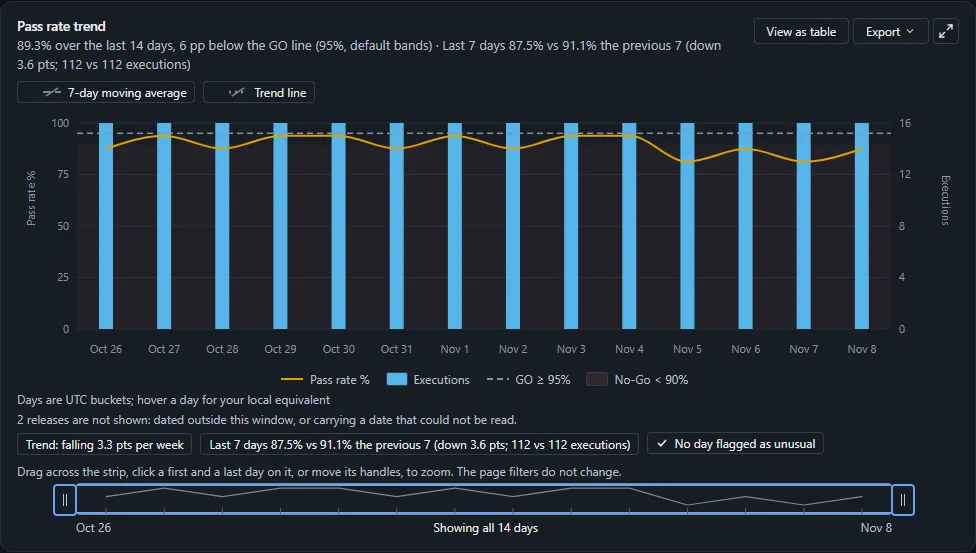
Pass rate trend over 14 days at 89.3% overall: the daily pass rate between 81% and 94% as a line over daily execution bars, a dashed GO line at 95%, a shaded No-Go band below 90%, and the chips Trend falling 3.3 pts per week and Last 7 days 87.5% vs 91.1%.
Sample data Trends against your GO line

Every override and review leaves a record

People make the final call, and TestLookup records who decided what, and why.

Overrides

Overrides need a written reason

A QA lead or administrator can change a test run's recommendation to GO, Conditional GO or NO-GO, but only with a written reason. TestLookup keeps the calculated verdict. The override sits beside it in the history and in the audit log, a record of who did what.

  • A policy can forbid some overrides
  • Completing a phase that isn't GO, or skipping a phase, needs a reason too
  • Each phase override or skip goes into the audit log and the activity feed
  • This phase check is on by default for new installations

Review gate

AI reports wait for a reviewer

Each AI report waits in Inbox › Approvals for a QA lead to accept or reject it. By default, the review gate only logs what it would have held back, so unreviewed reports still go out. An administrator can set a date after which unreviewed reports stay inside TestLookup.

  • Accepting or rejecting needs a person signed in, not an API key
  • The person who asked for a run that proposes actions can't accept or reject its report
  • A rejection needs a reason code
  • Once the gate is on, a run's recommendation reads Pending review until its report is accepted

Check releases in CI and keep the evidence

The same saved verdict reaches your pipeline, your AI assistant and your auditor.

Command line and AI assistants

Fail the pipeline on NO-GO

The command-line tool reads the release's saved verdict and turns it into an exit code, a number any CI system can act on. AI assistants such as Claude or Cursor read the same verdict, and a single run's readiness, through TestLookup's MCP server.

  • Ends with 3 when a release was never evaluated or has too few results
  • It can record a fresh verdict first, then read it
  • An unknown release name ends with 2, so the check fails instead of passing
Check a release in CIbash · TestLookup CLI
testlookup release gate "2026.11" --project "Checkout Service" --evaluate --fail-on NO_GO

With --evaluate, it records a fresh verdict first. It ends with 0 for GO, 1 for NO-GO, 3 when there's no verdict yet, and 2 when TestLookup can't answer.

  • Signed compliance packs

    One action bundles a release's decision, a copy of the policy at the time, the decision history, defects and audit events. TestLookup signs the bundle with your installation's key, and you can check it in the app or offline with the command-line tool. A pack is evidence for your auditor, not a certification.

  • Summaries quote the saved verdict

    Daily, weekly and per-release summary messages, called digests, show the release's saved verdict without working it out again. A release nobody has evaluated reads not evaluated yet instead of GO.

  • An audit trail you can filter

    The audit dashboard lists verdict overrides, quarantine decisions and report exports over 7, 30 or 90 days. Each project's activity log keeps a before-and-after view of every change.

How a release decision is made

A single test run and a whole release are judged in different ways. Reviewing an AI-written report is a separate step.

Diagram of release decisions: for one test run, results, pass rate, project rules and flaky-test signals combine and the strictest wins, giving GO, Conditional GO or NO-GO, which a person may override with a reason; for a whole release, the latest result of each test and open defects give GO, NO-GO or Not evaluated; report review is a separate step that can hold back sharing.Diagram of release decisions: for one test run, results, pass rate, project rules and flaky-test signals combine and the strictest wins, giving GO, Conditional GO or NO-GO, which a person may override with a reason; for a whole release, the latest result of each test and open defects give GO, NO-GO or Not evaluated; report review is a separate step that can hold back sharing.
How a release decision is made

How a release decision is made

The full text description remains below the inline figure.

Scroll within the image to inspect it at full size.

Every step is written out under Text equivalent below.

Text equivalent

  1. One test run

    TestLookup weighs the results and pass rate, your project’s rules, and failure and flaky-test signals. The strictest one wins: GO, Conditional GO or NO-GO.

  2. Override

    A person with permission can override a run’s decision. They must give a reason, and TestLookup keeps it.

  3. A whole release

    For a release, TestLookup looks at the latest result of every test and any open defects. The result is GO, NO-GO or Not evaluated.

  4. Report review

    A person reviews AI-written reports. If an administrator switches the review gate on, unreviewed reports are held back from exports and share links.

Boundaries and limitations
  • Not evaluated means too little was tested, or open defects have no severity yet. It is never shown as a pass.
  • Accepting a report never turns a release into GO.
  • Each time a report is sent out, TestLookup checks the current review setting again.

Walk through a release review

Follow a sample release from test results to verdict in your browser, using made-up data. Or run TestLookup on your own computer.