AI · Local models · Audit trail

AI you control, on your own network

TestLookup can analyze your failed software tests with a local AI model, or with a hosted one if your installation allows it. Without a model, rules still check every failure. Every answer records what produced it, and running the analysis again keeps the earlier answer.

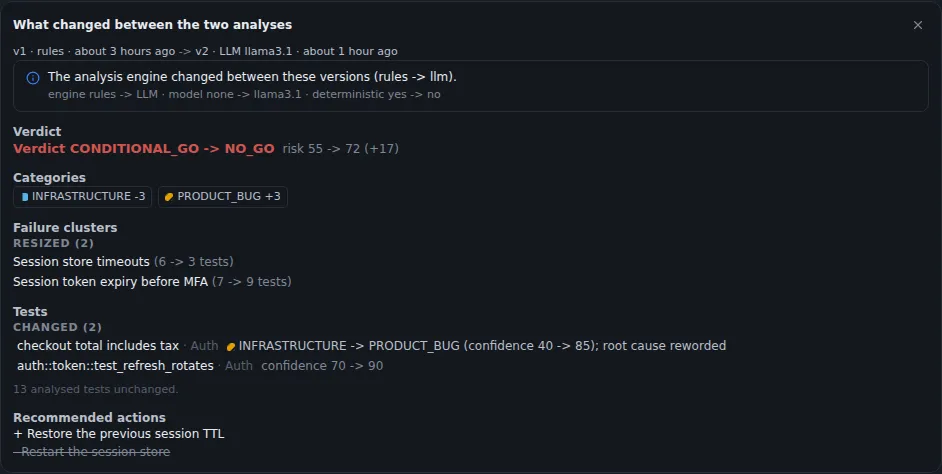
What changed between two analyses of the same test run: the engine moved from rules to an AI language model, the run's verdict from Conditional GO to NO-GO, two failure groups changed size, and two tests were reclassified with higher confidence.
Sample data Two AI analysis versions compared
  • Offline by defaultOffline mode is on from the start. Hosted models stay blocked until your server settings turn it off.
  • Monthly spending limitsSet a monthly AI spending limit for each project. Past the warning level, analysis can switch to your trained model or to rules.
  • Answers you can traceEach answer names its source: a person's correction, a project hint, rules, your trained model or an AI model.

Any model, local first

Choose a model server on your own network, or a hosted AI provider. Model calls stay on your network unless your installation allows otherwise.

Providers

Local model servers or hosted providers

Point TestLookup at Ollama, LM Studio, LocalAI or vLLM on your own network, or at OpenAI, Anthropic, Gemini or OpenRouter. A new installation uses Ollama with the qwen2.5:7b-instruct model, which is open source under Apache-2.0. Administrators change the provider and model in Settings › AI, and TestLookup stores the keys for hosted services encrypted.

  • The settings page checks that each required model is installed
  • Ask AI can use its own chat model on the same provider
  • Without any AI model, analysis uses rules and your trained model
Settings for a local model (.env file)text · Single-server setup guide
LLM_PROVIDER=ollama
LLM_MODEL=qwen2.5:7b-instruct
EMBEDDING_PROVIDER=ollama
EMBEDDING_MODEL=nomic-embed-text:v1.5
AI_OFFLINE_MODE=true

These are the local-model lines from the .env settings file in the single-server setup guide. Once TestLookup is running, make dev-llm downloads the three models it uses: qwen2.5:7b-instruct, qwen2.5:14b-instruct-q5_K_M and nomic-embed-text:v1.5. Search by meaning keeps using the built-in MiniLM model until an administrator chooses Re-embed now in Settings › AI.
Offline mode

Hosted models stay blocked by default

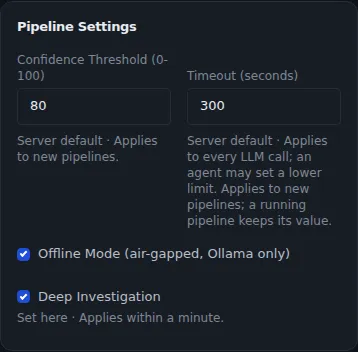
Offline mode is on by default. While it's on, TestLookup refuses every hosted provider, and any local model address that points to the public internet. Only the server settings can turn offline mode off, and the settings page can only turn it on.

  • Optional allow-lists limit which providers and addresses an administrator can choose
  • Offline mode also stops webhooks, new Jira issues and calls to GitHub and GitLab
  • Hosted services that index text for search are refused, and the built-in one downloads no model files
  • An offline model pack covers installations with no internet connection at all
  • It controls model and integration calls. It isn't a network firewall.
AI pipeline settings: confidence threshold 80, LLM timeout 300 seconds, Offline Mode (air-gapped, Ollama only) ticked and Deep Investigation ticked.
Sample data Offline mode in the AI settings. Despite the label, it allows any model server you host on this machine or your private network

Spend on larger models only when needed

Choose how failures are analyzed, and set for each AI agent, or automated helper, whether it uses no model, a small one or a large one.

Analysis modes

Rules, ML, LLM or Auto

Rules need no model, ML uses machine learning trained on your team's labels, and LLM uses the AI language model you set up. Auto, the default, tries the trained model first, then a reachable AI model, then rules, and records why. For each agent, a project also picks a model size: none, small, large, or Auto, which moves up to the large model only on set triggers.

  • In Auto, each step starts on its usual model size
  • Root cause analysis moves up when confidence is low, and the summary moves up when its check fails
  • Each move up is limited by a cap on moves, a call allowance and the money left to spend
  • If a move up is refused, the step keeps its no-model answer and is marked Degraded, meaning it fell back to a simpler result
  • If an AI model call times out, TestLookup falls back to a faster classifier, then to rules

Spending limits

Monthly AI spending limits per project

An administrator sets each project's monthly hard limit and a warning level. Past the warning level, the action you chose happens: log a warning, switch analysis to ML or to rules, or block AI model calls. At the hard limit, TestLookup always blocks model calls, and models you host yourself always count as zero spend.

  • Ask AI model calls count against the same project limit
  • Each agent also has limits per run on calls, tokens and spending
  • A safety switch, called a circuit breaker, pauses calls to a model server that keeps failing

Deep analysis you can check

Each answer names what produced it, and a deep investigation ends with a final check. Every analysis is kept as a version you can compare.

Layered answers

Your corrections come before any model

The next time a test is analyzed, a person's correction comes first, then your project's classification hints. After that, rules, your trained model or an AI model decide. TestLookup reuses earlier AI answers for the same or similar failures to save repeat calls, and every answer records its engine and the basis of its confidence.

  • The trained model learns from your team's confirmed and corrected labels
  • It starts work only after 200 labelled examples and 80% accuracy on examples kept back for testing
  • Automatic actions happen only at or above the confidence threshold, 80 by default
  • A correction also removes the wrong answer from the saved answers

Root cause (AI)

Deep investigation, with a final check

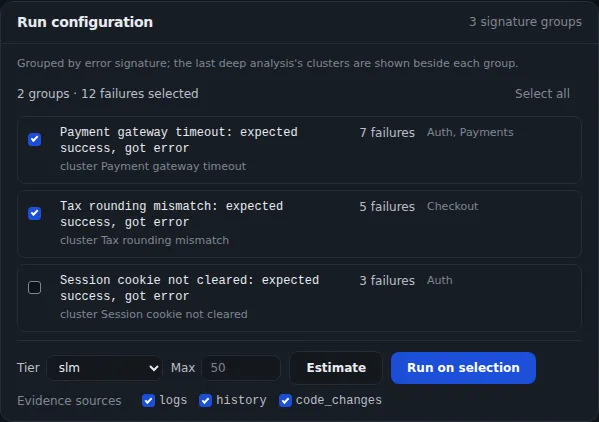
Failures › Root cause (AI) starts a deep investigation of one run, described on the AI agents page. It groups the run's failures, checks each group against the evidence, and records a finding for each. Before it starts, you pick the failure groups, the model size and the evidence sources, and see an estimate of time and cost.

  • A final step, the critic, holds back any report it can't verify
  • Settings for one investigation can only make the project's agent settings stricter
  • Up to 500 failures per run. Grouping them by error beforehand uses no AI model.
  • Estimates come from the project's last 20 completed investigations
  • Not available in Rules mode, and in offline mode only a local model can run it
Settings for a deep investigation: failures grouped by error with counts and suites, a model tier, a limit on failures, Estimate and Run on selection buttons, and the evidence sources logs, history and code changes.
Sample data Configuring a deep investigation

AI history

Compare any two analyses of a run

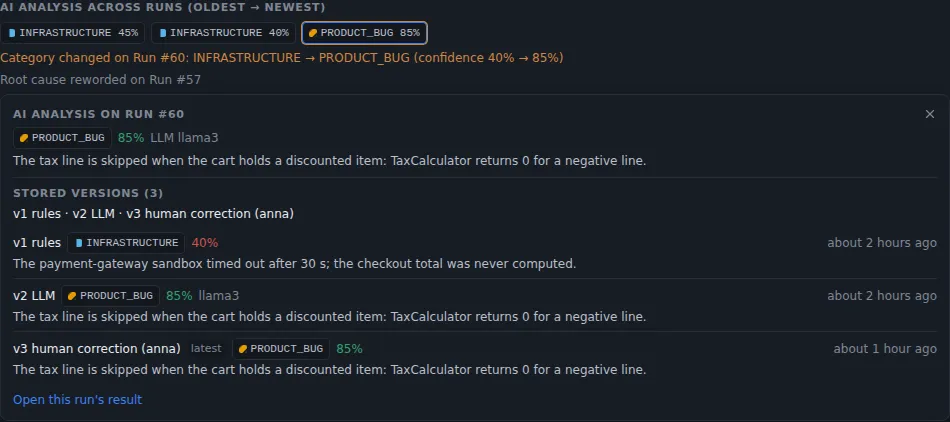
TestLookup saves each analysis of a run or test result as a version that can't be changed, with its engine and model. Compare any two versions, or compare a run with the previous run of the same suite on the same branch. The comparison needs no AI model, which only writes the optional summary in words.

  • Comparisons say first when two analyses came from different engines
  • Without a model, fixed rules build the summary, and it's labelled that way
  • Read the same history from the command-line tool or through the MCP server
AI analysis across runs: stored versions from the rules engine, a language model and a human correction, with the category changing from infrastructure to product bug.
Sample data Each analysis is kept as a version, including human corrections

Search that stays on your network

TestLookup turns text into embeddings, which are number patterns used to find similar text, on your own machines. So search by meaning, similar failures and drafts based on your documents work without a hosted model.

Embeddings

A built-in embedding model that needs no graphics card

Off by defaultNot in make dev. On Docker Compose, make dev-llm starts the search index. On Kubernetes, you set it up separately.

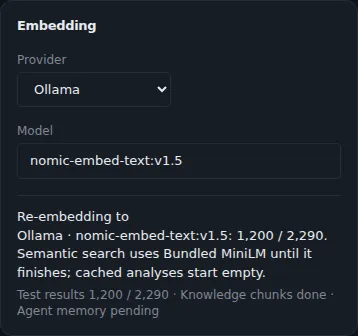
Once the search index is running, ChromaDB's built-in all-MiniLM-L6-v2 model makes every embedding on the ordinary processor, inside the API and background workers. An administrator can switch to an Ollama embedding model instead. TestLookup then rebuilds the index in the background and switches over only when the new one is complete.

  • Embeddings from different models are kept apart
  • One embedding model serves search, similar failures, saved answers, agent memory and drafts
  • If a rebuild fails, the current index stays in use
Embedding settings: provider Ollama with the nomic-embed-text model, and re-embedding in progress while search by meaning keeps using the built-in model until it finishes.
Sample data Switching the embedding model

Search by meaning

Find failures that read alike

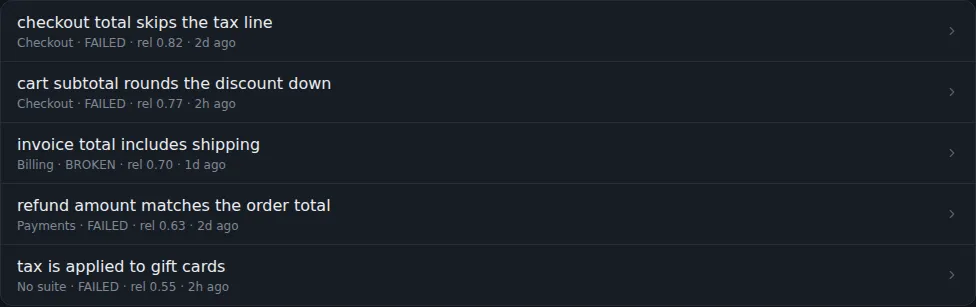
Search test results by meaning as well as by words, in Semantic or Hybrid mode. A failed test's Similar failures tab lists up to 5 failures from the same project that read most like it. The analysis steps and Ask AI also recall earlier analyses of similar failures.

  • Semantic and hybrid search cover test results, and keyword search covers everything
  • Without the search index, search uses keywords and tells you so
  • New test results join the index every hour
  • Agent memory recalls corrections, earlier analyses and quarantine history
Similar failures for a failed test: five failing tests from different suites ranked by relevance, such as checkout total skips the tax line at 0.82.
Sample data Similar failures found by meaning

Knowledge base

Test case drafts based on your specs

Off by defaultTurn on the knowledge base setting, then add sources through the API.

Add your specs, API docs or runbooks as knowledge sources, and TestLookup drafts test cases from the passages it finds. Each draft cites those passages and waits for a person's approval before it joins the catalog. TestLookup flags a draft as out of date when its source changes, and each project's documents stay in that project.

  • You add and sync sources through the API
  • Web address sources must pass an allow-list and a check of the address type
  • Drafting needs an AI language model, local or hosted

AI you can audit

AI reports go to a reviewer, and TestLookup measures AI quality against reference sets and your team's own answers. Ask AI shows every lookup it makes.

Review gate

A person accepts or rejects each report

Off by defaultHolding reports back starts on a date an administrator sets in Settings › AI › Review gate.

Every AI report becomes a review request in Inbox › Approvals. A QA lead accepts it, or rejects it with a reason such as an unsupported claim or missing evidence. After a date an administrator sets, unreviewed reports stop going out through exports, share links, notifications, webhooks and pull request comments.

  • Until then, the gate only records what it would have held back
  • The settings page counts what it would have held back over the last 30 days
  • Accepting needs a person signed in, and API keys are refused
  • The person who asked for a run that proposes actions can't decide its review

AI quality checks

Measure the AI before you trust it

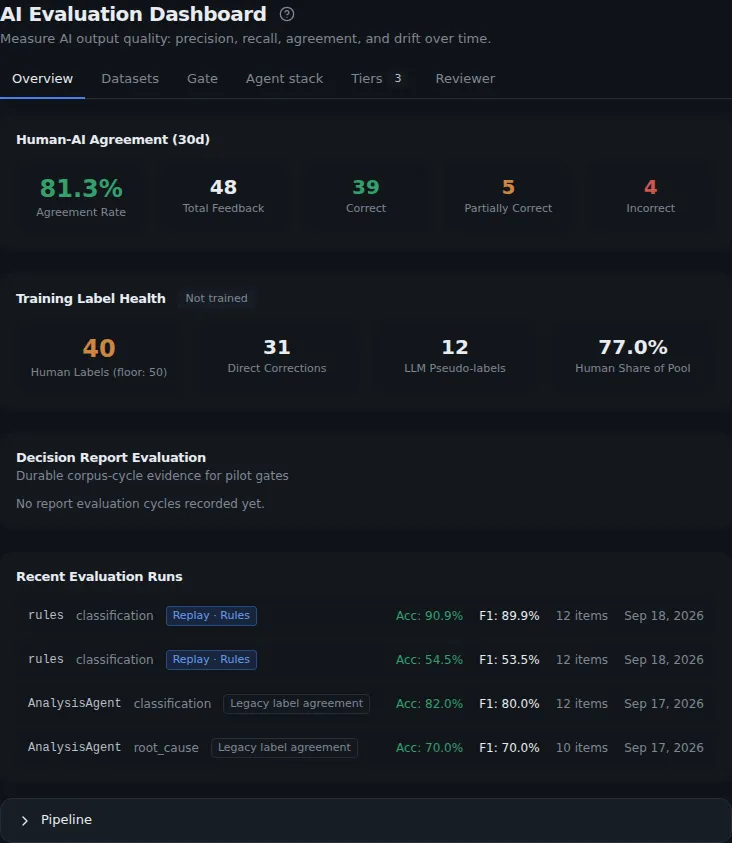
The AI evaluation page builds test sets from your team's confirmations and corrections, next to reference sets with confirmed answers that come with TestLookup. Try a candidate model size on up to 200 examples, and run a check before release that answers PASS, FAIL or not enough evidence. You can also watch quality change over time, and see a small local model and a large AI model answer the same case.

  • A measure with nothing scored reads Not measured instead of 0%
  • Each prompt is tied to a fingerprint, so no prompt can change unnoticed
  • Administrators run quality checks, and QA leads can read every tab
AI evaluation dashboard overview: human and AI agreement over 30 days, training label health, and recent evaluation runs with accuracy and F1, with tabs for datasets, gate, agent stack, tiers and reviewer quality.
Sample data AI evaluation dashboard

Ask AI

Answers that show their sources

Ask AI answers plain-language questions about one project: what failed, what changed between builds, which tests are flaky and whether it's ready to release. Every answer lists the lookups it made, which only read data, and links to the builds and tests it names. A suggested action opens a filled-in form, and nothing changes until you submit it.

  • Needs a reachable AI model, local or hosted, in Auto or LLM mode
  • TestLookup sets the project, so the AI model can't pick another
  • Chat model calls count against the project's monthly AI spending limit

Run it with a local model

Start TestLookup with Ollama and its local AI models on your own machine, with offline mode on from the start.