

Integrations

Put test results where your team already works

Post software test results on pull requests waiting for code review, file approved defects in Jira, and alert the team that owns a failing test. Your continuous integration (CI) system can stop a release that isn't ready. Offline mode is on by default and keeps all of this inside your network until you allow more.

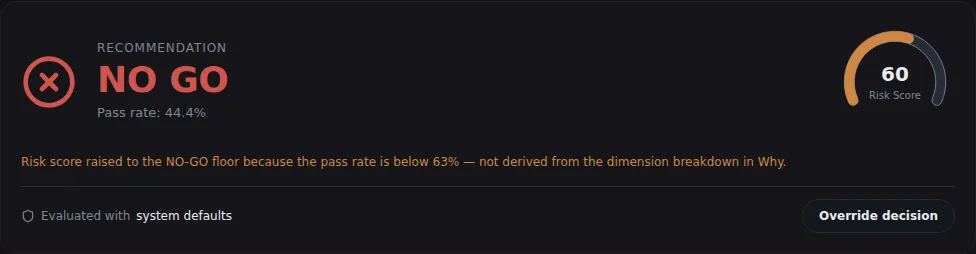
Release gate card for one test run: a NO GO recommendation at a 44.4 percent pass rate, a risk score of 60, and an Override decision button.
Sample data A test run's recommendation on the Release gate page, with its risk score
  • Pull requestsA check, a status on each commit, and one summary comment kept up to date on each pull or merge request.
  • Release checks in CIOne command lets your CI job pass or stop based on a release's decision.
  • AI assistantsClaude, Cursor and other AI assistants get 80 TestLookup tools through MCP, a standard way to connect assistants to other software.

Results in code review and Jira

Each of these posts only after you set it up, switch it on and turn offline mode off.

Code hosts

GitHub and GitLab

When a test run comes from a pull request on GitHub or a merge request on GitLab, TestLookup keeps one comment on it up to date. The comment lists newly failed tests, failures from known flaky tests that pass and fail at random, and tests the change fixed. Runs with a full commit ID also post a GitHub check or a GitLab commit status.

  • A GitHub check can show notes on up to 50 tests
  • If every failure comes from a known flaky test or one set aside (quarantined), the check ends as neutral
  • GitHub milestones become releases, and the commits in a change are ranked by how likely each one caused a failure
  • TestLookup connects to GitHub with a token or as an installed GitHub App

Issue tracking

Jira, after a person approves

When someone promotes a defect with a Jira project key, it waits for a QA lead to approve it. Approval files the Jira ticket, or links the open issue already filed for the same failure. That way, each failure gets only one ticket.

  • Approvals wait in Inbox › Approvals with severity, owner team and reason
  • When the same failure comes back, TestLookup adds a note to its existing ticket
  • No Jira? A webhook, an automatic message to a web address you choose, can send the ready-made ticket to any tracker

Alerts that reach the owning team

While offline mode is on, Slack, Teams and email reach only addresses on the same machine, on your private network, or ones your operator lists.

Notifications

Slack, Teams and email

Shared channels get alerts and scheduled summary messages for your whole installation. A QA lead can give each team in the ownership rules its own channel. Everyone picks the events they want on My notifications.

  • A failing test alerts the team that owns it
  • Each project's notification policy decides which events are sent at all
  • Summaries go out daily, weekly, or per run, release or suite
  • Email goes through your own mail server over an encrypted connection. Details: SMTP with implicit TLS or STARTTLS

Webhooks

Signed webhooks to your own systems

Subscribe your own web address to six events, from a finished run to a release decision. If the subscription has a secret, TestLookup signs each message so the receiver can check where it came from.

  • Details: the X-TestLookup-Signature header holds the hex HMAC-SHA256 of the raw request body
  • TestLookup retries after network errors and after HTTP 408, 425, 429, 500, 502, 503 or 504
  • You can resend failed messages, and repeated failures pause the subscription
  • Nothing is sent while offline mode is on

Check releases, write scripts and ask your AI assistant

The command-line tool (CLI) and the code libraries (SDKs) aren't on public package sites yet. Install them from the repository, or download them from your own TestLookup server.

CLI

Check a release from any CI system

The release gate command shows a release's saved decision. It then ends with a fixed exit code, a number that tells your CI job to continue or stop. It can also work out and record a fresh decision first, which needs a QA lead's sign-in or a project API key.

  • If TestLookup can't answer, the step fails instead of passing. Details: exit code 2, or 0 with --fail-open
  • Details: --evaluate records a fresh decision before the check
  • For a single test run, the ci-verdict command passes when every failure is in a quarantined test
  • The projects export and projects import commands move a project, with its history, to another TestLookup server
  • The CLI has its own version number, 0.4.0 today, separate from the server's
Release check in GitHub Actionsyaml · TestLookup CLI
# GitHub Actions
- name: Release gate
  run: testlookup release gate "2026.10" --project "Checkout Service" --evaluate --fail-on NO_GO
  env:
    TESTLOOKUP_URL: ${{ secrets.TESTLOOKUP_URL }}
    TESTLOOKUP_API_KEY: ${{ secrets.TESTLOOKUP_API_KEY }}

The step ends with exit code 0 for GO, 1 for NO-GO, and 3 when the release is Not evaluated or has no decision yet. The CLI reads TESTLOOKUP_URL, while the MCP server below reads TESTLOOKUP_API_URL.

MCP

Ask your AI assistant about test results

The MCP server gives Claude, Cursor and other AI assistants 80 tools, 11 resources and 7 prompts on your own TestLookup server. It signs in as a TestLookup user with a username and password, then uses the sign-in token (JWT) it gets back. It doesn't accept API keys, and TestLookup checks that user's role and project access on every call.

  • Runs on the same machine for desktop apps (stdio), or over the network with sign-in for remote agents (SSE)
  • From a chat, propose quarantines, correct failure categories and file defects
  • There's no tool to accept or reject AI reports, so that decision stays with a person
  • Every change is recorded under the agent's own user account
Claude Code .mcp.jsonjson · MCP server
{
  "mcpServers": {
    "testlookup": {
      "command": "python",
      "args": ["/absolute/path/to/testlookup/mcp/server.py"],
      "env": {
        "TESTLOOKUP_API_URL": "http://localhost:8000",
        "TESTLOOKUP_USERNAME": "agent-bot",
        "TESTLOOKUP_PASSWORD": "<agent-bot password>"
      }
    }
  }
}

Before you add it, clone the repository and run pip install -r mcp/requirements.txt with Python 3.11. Create a separate TestLookup user for the agent, with only the role it needs. Claude Desktop and Cursor take the same settings block.

SDKs

Send results while tests run

Reporter libraries for Python, JavaScript, Java and Go send results to TestLookup while your tests are still running. The run appears on the live view before it finishes.

  • Python: a pytest plugin and a Robot Framework listener
  • JavaScript: Jest, Mocha, Playwright Test, Vitest, Cypress and Cucumber JS
  • Java: TestNG and JUnit 5 or 6, with RestAssured capture
  • Go: helpers for Go's built-in testing package

Evidence from logs, clusters and metrics

Set up each one in Settings › Integrations. TestLookup checks the host before it sends a token, and offline mode blocks every lookup.

  • Splunk

    Searches in Splunk, a log search tool, add log evidence to the AI analysis of a failure.

  • OpenShift and Kubernetes

    Lookups of running containers (pods) and cluster events add evidence from your cluster to the same analysis.

  • Prometheus

    In a deep investigation, up to 12 query templates (PromQL) compare monitoring data from the software under test, before and during a failure.

Connect your first integration

Start TestLookup on your own computer, then check a release from your CI system.