

Self-hosted · Secure · Offline

Your servers, your data, offline by default

Run TestLookup on your own servers with Docker Compose, Kubernetes, K3s or OpenShift, using your own databases and storage. It works even on a network with no internet connection. Single sign-on, audit records, data retention rules and signed exports are built in.

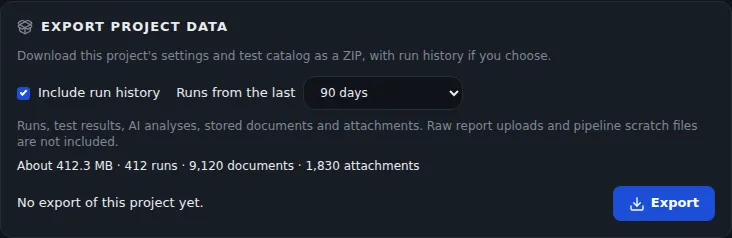
Export project data card with an Include run history option for the last 90 days and an estimate of size, runs, documents and attachments.
Sample data Export a project with its run history
  • Works with no internetAn offline install bundle and an AI model pack, each with checksums, for sites with no internet connection.
  • Single sign-onCompany sign-in with SAML 2.0 or OpenID Connect, automatic user setup, two-step sign-in and five roles.
  • Signed exportsMove a project, with up to 2,000 finished test runs, to another TestLookup server.

Install on servers you control

Deployment

Compose, Kubernetes, K3s or OpenShift

Start on one machine with Docker Compose, which runs TestLookup and the services it needs together. Or deploy to Kubernetes, with ready-made settings for standard clusters, managed cloud services, OpenShift (Red Hat's Kubernetes) and K3s (a lightweight Kubernetes). Sites with no internet build an offline bundle on a connected machine, check it after copying it across, and load it into a local image registry.

  • K3s runs on one machine or more, and an optional script can set it up over SSH
  • An offline model pack, with checksums, holds the local AI model and the model that finds similar failures
  • MongoDB isn't in the bundle, so copy its image into your own registry
  • New images are published for every commit (saved change) on the main branch, so choose one by its commit ID
Build and check an offline bundlebash · Offline bundle
# On a connected host, in a clone of the repository
make offline-bundle   # writes dist/testlookup-offline-0.1.0.tar.gz and its .sha256

# On the offline site, after copying both files across
sha256sum -c testlookup-offline-0.1.0.tar.gz.sha256
tar xzf testlookup-offline-0.1.0.tar.gz
cd testlookup-offline-0.1.0
./import-bundle.sh --verify-only   # checks every file in the bundle

If any checksum doesn't match, the import stops.

After you install

Back up and upgrade with one command

On Docker Compose, each routine task after install is one command. The backup command saves PostgreSQL, MongoDB and file storage in one archive. The upgrade command updates the database first, then replaces the application and runs a quick check.

  • A preflight command checks image tags, waiting database updates and free disk space
  • Restore won't load a backup older than the installed database version unless you force it
  • There's no automatic rollback. To go back, restore the backup you made before upgrading
  • On Kubernetes, you can add an optional daily backup job
Upgrade on Docker Composebash · Makefile
make preflight TAG=<image-tag>   # read-only: current vs target images, pending migrations, disk headroom, newest backup
make backup                      # your rollback path — do not skip this
make upgrade TAG=<image-tag>     # pull, migrate, restart in dependency order, health-check, smoke-test

TAG is the image tag to download. There's no 0.1.0 release yet, so each main build's images are tagged with its full commit ID. A stack built from source rebuilds instead.

  • PostgreSQL and MongoDB

    PostgreSQL, the main database, stores runs, tests, projects, users and audit records. MongoDB stores evidence documents and the log of each analysis pipeline's events.

  • Valkey and S3 storage

    Valkey, a Redis-compatible message broker, runs the queues of background jobs. S3-compatible file storage keeps reports, attachments and exports.

  • ChromaDB and Ollama, optional

    ChromaDB adds search by meaning, and Ollama runs an AI model on your own server. Neither is required, and on Docker Compose only make dev-llm starts Ollama. The Kubernetes base setup includes Ollama, with a 32Gi memory limit and a 50Gi model volume.

Control access and keep a record

Identity and access

Sign in through your identity provider

Let people sign in with their company account through single sign-on, using SAML 2.0 or OpenID Connect. SCIM, a standard for syncing user directories, sets up users and groups for you. Five roles, from Viewer to Administrator, work with project membership to decide what each person can see and change.

  • Two-step sign-in with an authenticator app (TOTP) gives ten single-use recovery codes, and you can require it per role
  • By default, 10 failed sign-ins lock an account for 15 minutes
  • API keys, the secret keys scripts use, belong to a person or one project, and each is limited to live results, writes or admin
  • SCIM groups map to project roles and can't grant Administrator

Records and retention

Audit records and retention you control

The audit dashboard lists overruled gate decisions, quarantine decisions, settings and identity changes, and report exports. Each project's activity log records every event, showing what changed before and after.

  • Each project can have its own rules for how long data is kept, off until an administrator turns them on
  • A retention hold blocks every purge and deletion of the data it covers
  • Delete runs that match your filters, and archive them first in a signed file if you like
  • Administrators export audit records as CSV. Project QA leads export activity as CSV or NDJSON

Move projects and share reports

Project export

Move a project with its history

Export a project's settings and test catalog as a signed ZIP file, with its finished-run history if you want it. Import it on another TestLookup server. An import always creates a new project and starts nothing: no result processing, AI call, notification, webhook or Jira call.

  • Up to 2,000 finished runs, newest first, in archives up to 2 GB
  • Secrets, members, API keys and audit logs stay behind
  • Large archives upload in 32 MB parts, and an interrupted upload can resume
  • It isn't a backup. Raw uploads, defects and server-wide settings stay behind
Export and import with the CLIbash · TestLookup CLI
testlookup projects export "Payment Service" --history --days all -o payment-history.zip
testlookup projects import payment-history.zip                # parts of 32 MB when over 50 MB; re-run to resume

Sharing and evidence

Share reports without sharing accounts

A share link lets someone without an account open one run report as a web page or PDF, until the link expires. A signed compliance pack, a bundle of evidence for auditors, records a release decision with its rules, decision history and audit events.

  • Links last 1 to 30 days, 7 by default, and you can cancel them
  • TestLookup shows the link once and stores only a hash of its secret part
  • Check a pack offline with the command-line tool. Details: testlookup compliance-pack verify
  • A compliance pack is evidence for your own assessment, and it isn't a certification

Secure and offline by default

By default, TestLookup blocks its own outgoing connections. It encrypts stored passwords and keys with a key you hold.

  • Offline mode, on by default

    In offline mode, TestLookup makes no calls to cloud AI providers, code hosts, Jira, webhooks or log, cluster and metrics tools. Notifications reach only private addresses or hosts your operator lists. Other traffic is infrastructure only: image downloads, DNS, time sync and AI model downloads not already cached.

  • Secret keys you can change

    One secret key encrypts stored integration passwords and two-step sign-in secrets. To change it, move the old value to the previous-key setting and set a new one. Production won't start with placeholder secrets. Details: APP_SECRET_KEY and APP_SECRET_KEY_PREVIOUS.

  • Health checks you can call

    Three health addresses report whether the server is running, whether PostgreSQL, MongoDB and the broker are ready, and which build is installed. An optional monitoring add-on loads 35 alert rules. Details: /health/live, /health/ready and /health/version.

Run it on your own servers

Start with Docker Compose on one machine, then move to Kubernetes when you need to.