Governance · Audit · Compliance

Prove who did what

See who changed what in TestLookup, whether a person, a script using an API key, or an AI agent. Control who can change it, keep test data as long as you must, and answer personal-data requests. Give auditors signed evidence they can check offline.

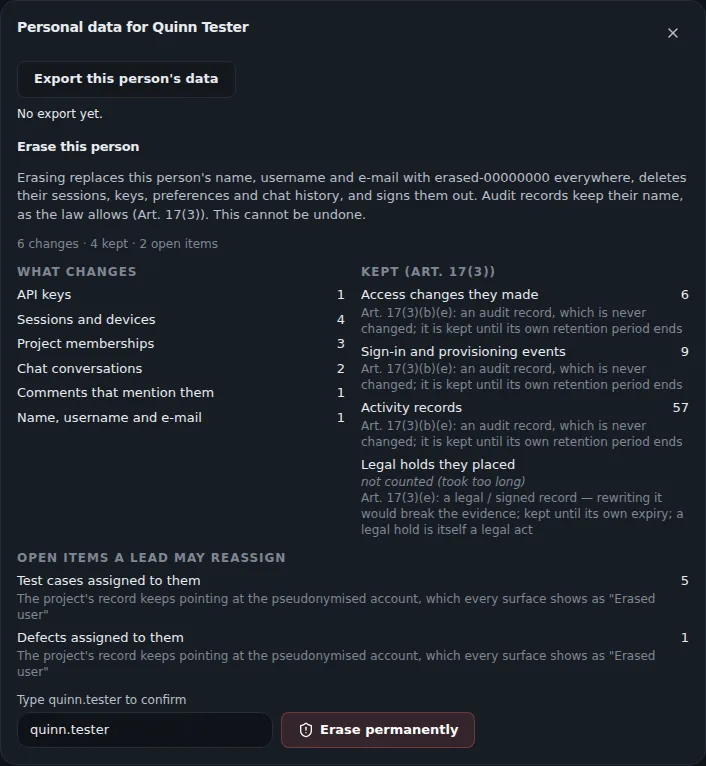
Personal data dialog for a test user: export the person's data, and a preview of deleting it that lists what changes, which audit records are kept under GDPR Article 17(3), and open items a lead may reassign, with a typed confirmation.
Sample data Previewing a personal-data erasure
  • Every change has a nameEach event says who acted: a person, an API key, a service account, TestLookup itself or an AI agent.
  • Signed evidence you can checkCompliance packs, the bundles of evidence you give auditors, are signed so anyone can check them offline.
  • No certification claimedGuides for SOC 2, GDPR and HIPAA show what TestLookup records and where your own controls take over.

A record of everything that happened

See what happened in each project and across your whole installation, from a test-case edit to a role change.

Activity log

See who changed what, and when

The activity log lists everything that happened in a project, in order, from test runs and analysis to releases, settings, members, test cases and agent actions. Filter it by who acted: a person, an API key, a service account, TestLookup itself or an AI agent. Open any event to see what it looked like before and after.

  • Inbox › Activity shows what you did and what involves you
  • A live view shows each new event about a second after it's saved
  • QA leads can export the log as CSV or NDJSON files
  • Through the API, you can get the full history of one run, release or rule
  • The command-line tool and the MCP server for AI assistants read the same log
Audit dashboard

One audit view for your whole installation

The audit dashboard brings together records of access, settings, test cases, identities and release decisions, grouped by category, for the last 7, 30 or 90 days. An administrator can export it as CSV, with sensitive values hidden.

  • Each export covers up to 365 days
  • Each person's access history shows role and membership changes, before and after
  • Changes to on/off features (feature flags) record who made them, when, and an optional reason
  • TestLookup only adds audit records, but the database itself allows edits. For proof against direct database changes, copy the records to write-once storage
  • TestLookup doesn't send alerts or forward records to a security monitoring system (SIEM). Export the CSV or read the tables instead

Control who can do what

Roles, project membership and your company's sign-in service decide who gets in and what each person can change.

Roles

Five roles, set per project

Five roles build on each other: Viewer, Tester, QA engineer, QA lead and Administrator. New users start as Viewer. Project membership decides which projects someone sees, and a member can have a different role in one project.

  • TestLookup stores API keys only as a hash, a one-way scrambled form, and a key can be limited to one project
  • Only administrators change roles and project membership
  • Administrators can reach every project without being members, so give that role to as few people as you can
  • TestLookup's own automated tests fail if a developer adds an API address without an access check

Single sign-on

Sign in through your identity provider

Off by defaultWhoever runs the server sets SSO_ENABLED and SCIM_ENABLED. An administrator then adds your provider in Settings › SSO & identity.

Connect your identity provider, the service your company uses for sign-in, with SAML 2.0 or OpenID Connect. TestLookup creates each account the first time someone signs in. Map groups from your identity provider to roles, and preview the role a person would get before you save.

  • SCIM 2.0 keeps users and groups in step with your directory, with groups mapped to project roles
  • With SAML, signing out from the identity provider also ends the TestLookup session
  • Set the highest role your identity provider can grant. Until you lower it, that's Administrator
  • Require single sign-on for everyone, and keep password sign-in as a backup for administrators
  • OpenID Connect sign-in uses PKCE, an extra security check, and checks the ID token against the provider's keys

Accounts

Two-step sign-in, lockout and invitations

Anyone can turn on two-step sign-in with an authenticator app, and they get ten single-use recovery codes. An administrator can require it for one role and every role above it. By default, 10 failed sign-in attempts lock an account for 15 minutes.

  • Requiring two-step sign-in is off by default. Lockout is on by default
  • Single sign-on accounts are exempt, and an API key always signs in with one step
  • A forgotten password is reset with a 60-minute emailed link, or with a link from an administrator
  • An invitation link creates the account with the role and projects it names
  • Administrators can resend or cancel invitations that are still waiting

Keep data as long as you need

Each project sets how long to keep each kind of data. A hold protects evidence from every purge and deletion.

Retention

Four time limits, with a preview first

Off by defaultAn administrator turns on each project's policy under Settings › Retention & purge.

Each project deletes old raw events, test runs, files and audit records on four separate clocks. A preview shows exactly what a purge, the clean-up of old data, would delete, even before you turn the policy on. A manual purge asks you to type the project's name, and every purge leaves an audit record of its cut-off dates and deletion counts.

  • Defaults: raw events 90 days, runs 365 days, files 180 days and audit records 2,555 days
  • Audit records must be kept at least as long as runs
  • By default, the scheduled purge always keeps the 10 newest runs, plus the newest passing run of the project and of each suite

Holds

Holds stop purge and deletion

Put a hold on a project, a release or a compliance pack for a legal matter or an audit, with a reason and an optional end date. While the hold is active, TestLookup refuses every purge or deletion of what it covers and names the hold. A release hold also protects its runs, their decision reports and its compliance packs.

  • QA leads place holds, and only administrators can release them, with a reason
  • Holds on single runs are placed through the API
  • If TestLookup can't read the holds, it refuses to delete anything
  • Hold records are never deleted

Answer a person's data request

People can download their own data. An administrator can export anyone's data, or erase a person after a preview.

Your data

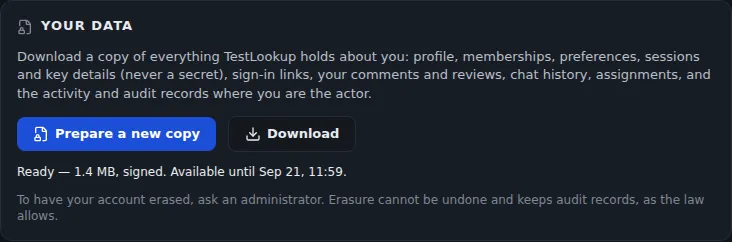
Download a signed copy of your data

Anyone signed in can download everything TestLookup holds about them from Settings › Profile › Your data. The download is a signed ZIP of JSON files, so it also answers a data portability request, and it stays available for 72 hours. It holds no passwords, key or token hashes, or two-step sign-in secrets.

  • An administrator can export any person from Settings › Users
  • Each request and each download is recorded in the access audit
  • An API key can't export or erase personal data
Your data panel in a profile: prepare a signed copy of everything TestLookup holds about you and download it for a limited time, with a note on how erasure works.
Sample data Download a copy of your data

Erasure

Erase a person, keep the audit trail

An administrator previews what an erasure changes and keeps, then types the username to confirm. TestLookup signs the person out and disables the account at once. It then replaces their name with a pseudonym everywhere and deletes their sessions, keys and inbox.

  • Audit records keep the stored name, as GDPR Article 17(3) allows. Your organization confirms that this basis applies
  • An interrupted erasure picks up again on its own within the hour
  • Other screens show Erased user. Administrators see the stored name in audit views
  • Mentions with @username are rewritten, but names typed as plain text stay as they are
  • An erasure can't be undone

Evidence auditors can check offline

Give an auditor signed evidence for each release decision, and a guide that maps TestLookup to common standards and states its limits.

Compliance packs

A signed record of each release decision

One action on a release bundles its decision with the evidence behind it. A SHA-256 manifest lists a fingerprint for every file, and your installation's Ed25519 key signs the manifest. Check a pack in the app, through the MCP server, or offline with the command-line tool.

  • A pack holds the rules in force at the time, the decision history with any override reason, linked defects, audit events and AI history
  • Kept about seven years, unless held, retired or deleted
  • The signing key is stored next to the data, so keep the public key on another machine
  • The signing time comes from the server's own clock, with no independent timestamp
  • Packs signed with an old key still check out after you change keys
Check a pack offlinebash · TestLookup CLI
testlookup compliance-pack verify pack.zip --public-key key.pem --manifest-sha256 "$RECORDED_SHA256"

Get the public key with the Public key button on a signed pack. Pass the manifest SHA-256 you saved on another machine when the pack was made. The command ends with 0 when the pack checks out, 1 for a changed file, a bad signature or the wrong key, and 2 when a file can't be read.

Project exports

Take a signed copy of a project

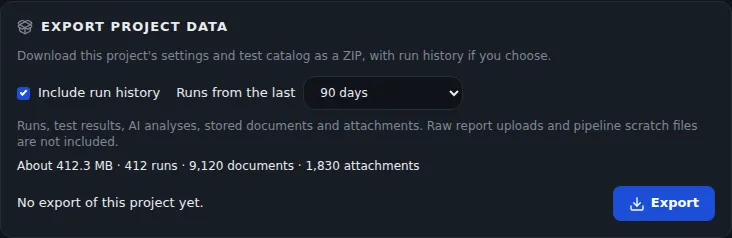
A QA lead can export a project's settings and test catalog as a ZIP signed with your installation's key, with its run history if you want it. Tokens and passwords are removed, so no secret leaves. An administrator can import it as a new project, but only after the signature and every file check out.

  • Run history from the last 30, 90 or 365 days, or all of it
  • The download stays available for 72 hours
  • Members, API keys, and activity and audit logs stay behind
Export project data card with an Include run history option for the last 90 days and an estimate of size, runs, documents and attachments.
Sample data Export a project with its run history

Control mapping

Mapped to SOC 2, GDPR and HIPAA

The compliance guide lists the SOC 2, GDPR and HIPAA points an auditor is likely to raise. For each one, it says what TestLookup records, where to see it, and what it doesn't cover. TestLookup isn't certified against any of these standards.

  • Your own policies, hosting and operations complete every control
  • No HIPAA business associate agreement is available
  • Each row points to a screen, API address, database table or source file
  • TestLookup encrypts only stored secrets. Encrypt your storage yourself
  • There's no built-in incident response, alerting or access review process

Run it on your own servers

Your audit records, data retention rules and signed evidence stay on servers you control.